Synopsis: If your Ver-Mac message board has a handheld controller, follow these steps to program a message. This is for the controller version with the Quick Program feature.
- Level: Easy
- Time required: Less than 2 minutes
- Additional equipment required: None
1. Log in to the handheld controller with the default password

Figure 1 - Login screen
2. Go to F1 – QUICK PROGRAM
Note: If you do not have the quick program option, see this article
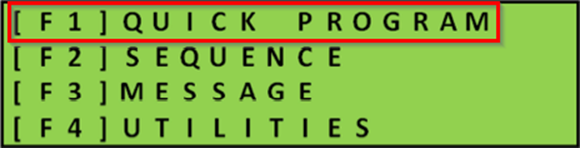
Figure 2 – Main menu

Figure 3 – Quick program menu
Note: If you already have an existing message, press F3 – CLR to clear it
3. Press the Enter key on your controller and type in your message
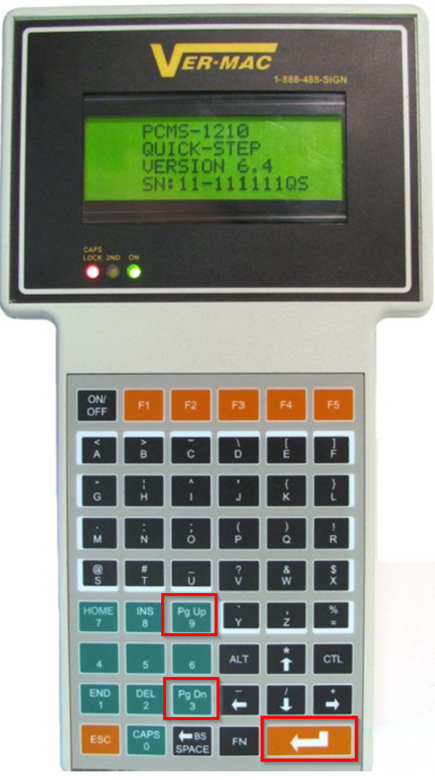
Figure 4 – Enter key & page up/down buttons
Note: Use the page up/down buttons or the left/right arrow keys to cycle through pages
4. Once your message is typed, press Enter again, then F1 – RUN to display it

Figure 5 - Run
5. If there are no errors, it will say Updating Sequence and your message will show up on the sign

Figure 6 - Updating sequence
Note: Your sequence can have a maximum of 6 messages/pages. If your sequence does not activate, log out of the handheld controller and check if the Status = Normal. If the Status is not Normal, it means you have an issue with the sign display.
If you require any additional help, contact our toll-free number at 1-888-488-7446 or email us at support@ver-mac.com
Comments
0 comments
Please sign in to leave a comment.